Bring room inventory, booking sources and channel costs into view. EHIS Channel Manager connects operational detail with revenue planning — from a booking reference to a more informed management conversation.
English-language illustration · Fictional example data
350prepared rooms
5restaurants
5bars
5additional outlets
5event rooms
From room inventory to room revenue
Understand the booking. See the contribution.
The value of a reservation is more than its headline rate. EHIS keeps room nights, booking status, commission and revenue after commission visible, so commercial decisions can be grounded in the same detail that operations uses.
01
One physical inventory
Maintain room capacity by property, room type and date. Deduct active booked room nights across channels before preparing availability.
02
Costs stay visible
Review each channel and the total. Actual commission amounts and contract-based estimates remain distinguishable.
03
Forecast with a basis
Separate realised business, future confirmed bookings and explicit additional planning on remaining open capacity.
The 350-room structure is a configuration starting point. Room names, capacity, rates and outlet details must be confirmed for the actual property. It does not demonstrate production readiness for a 350-room, multi-user hotel.
01 / Inventory & control
The right room. The right availability.
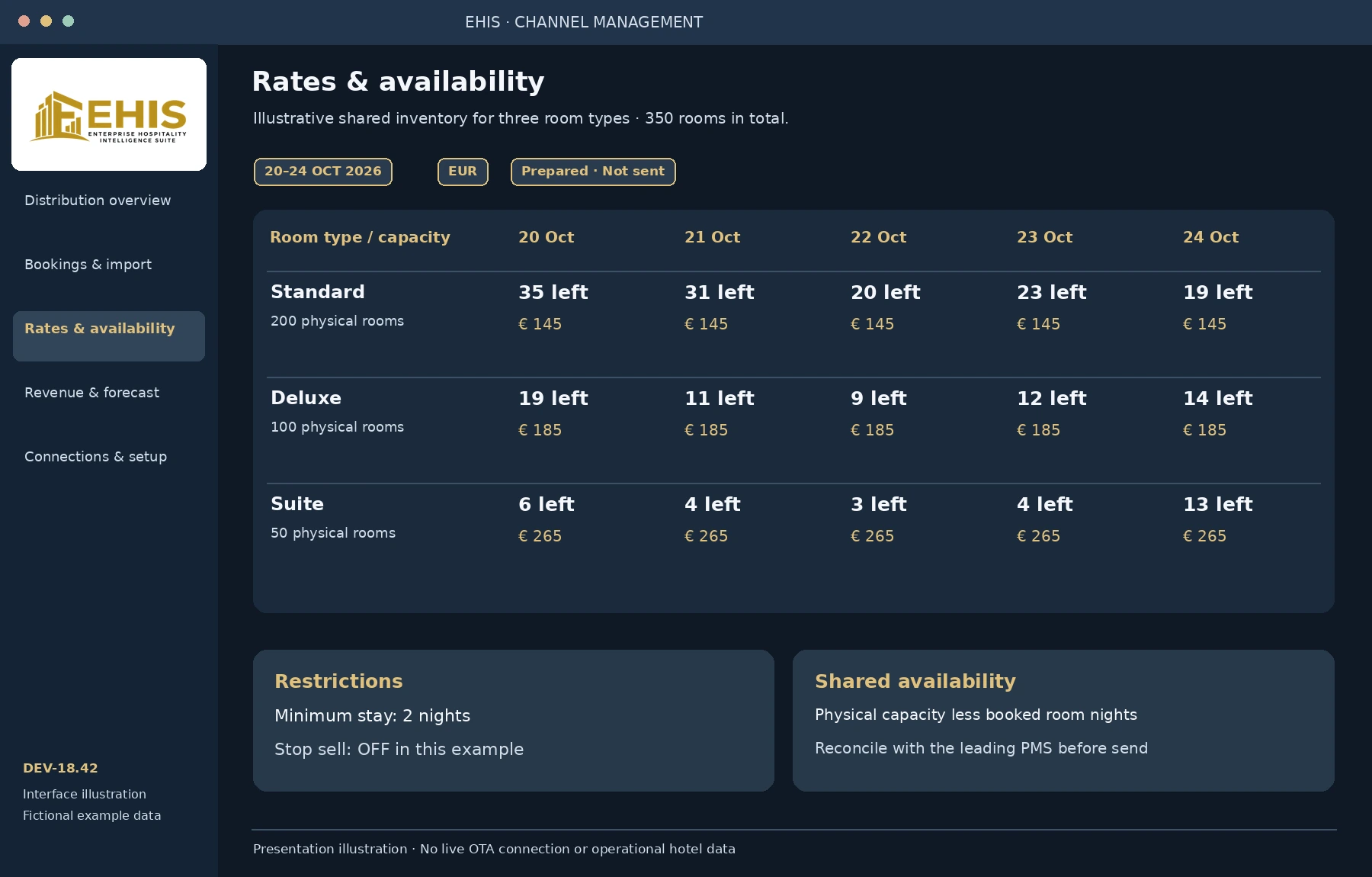
Build a date-based inventory calendar from verified room types. Set rates, minimum stays and stop-sell rules, then check the shared pool before preparing a channel update.
Create bookings locally or import CSV and normalised JSON. Stay revenue and commission are allocated to overnight rows, making comparison periods and channel totals easier to follow.
Actual, confirmed and cancelled statuses
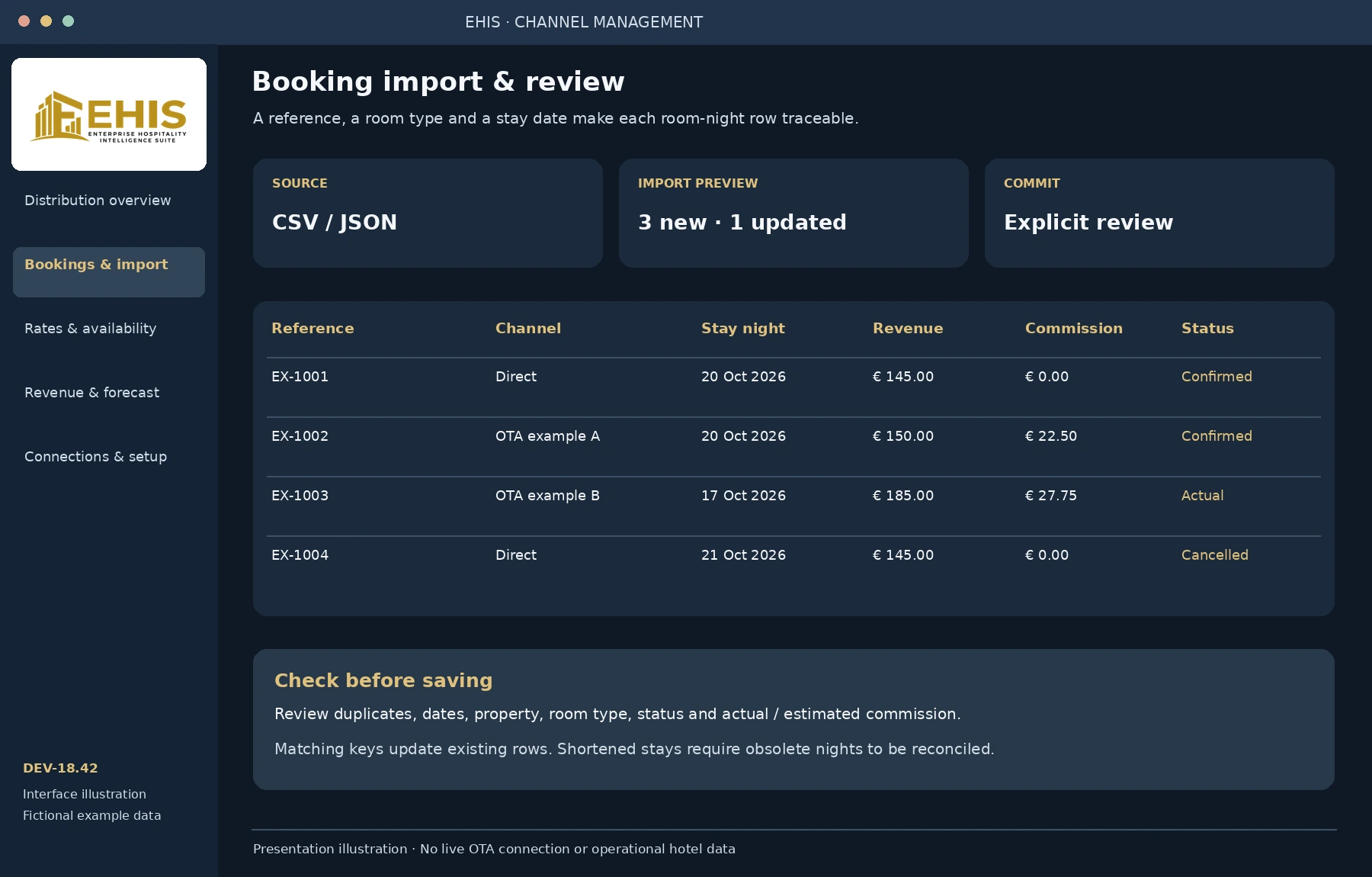
Import preview before committing changes
Matching keys update existing room-night rows
Shortened stays require obsolete nights to be reconciled
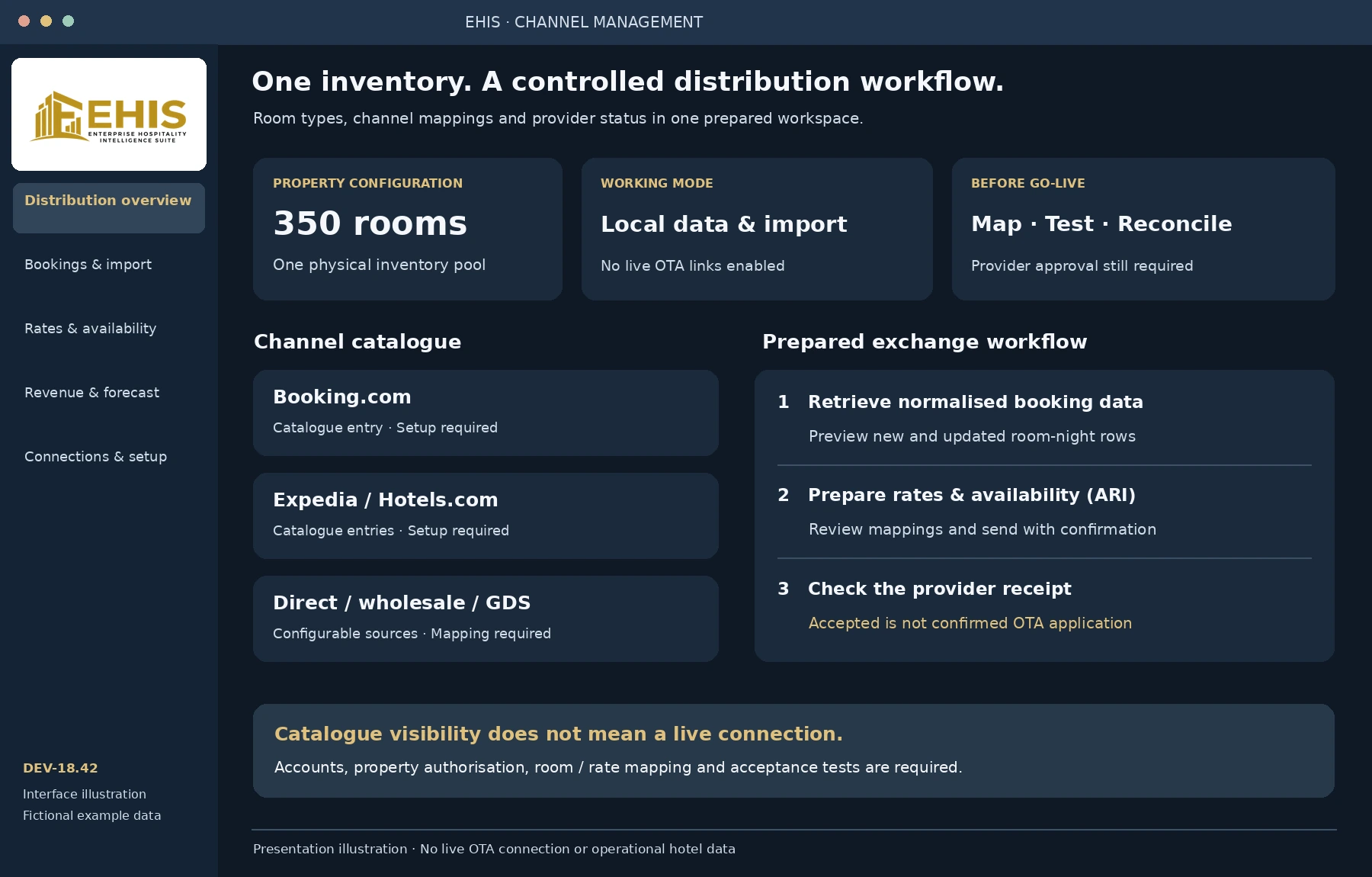
EHIS includes a configurable channel catalogue and a provider-bridge interface. A catalogue entry identifies a source for setup and reporting; it does not establish an approved live connection.
Direct bookings and additional user-defined channels. Confirm the actual contractual commission for every source.
All provider names above are catalogue references. No certification, commercial partnership or active OTA connection is claimed. Brand names belong to their respective owners.
A guided setup checklist
Property identity. Hotel ID, legal issuer, address, currency, timezone and responsible contact.
Room and rate mapping. Local room types matched to the provider's property, room and rate IDs.
Approved access. Provider endpoint and authorised account or token entered in the local software, not on this public website.
Controlled testing. Retrieve a test booking, inspect the preview, prepare a small ARI update and reconcile the provider result.
How the prepared bridge works
Receive. Review. Send. Reconcile.
Booking retrieval brings normalised room-night data into the import preview. Rates and availability — ARI — are prepared from the checked inventory and mapping.
Sending requires an explicit confirmation. A bridge receipt marked accepted means the request was received. Applied reports the provider's outcome; the OTA extranet must still be reconciled.
Supplier adapters, credentials, property authorisation and acceptance tests are required. Automatic continuous synchronisation and real-time overbooking prevention are not included in this release.
Prepared API contract for an integration specialist
The EHIS bridge contract uses GET /capabilities, GET /bookings?propertyId=…&from=…&to=… and POST /ari. These are EHIS adapter routes, not public OTA endpoints. An existing provider may need an adapter. Credentials remain in the local server configuration.
Select a property, channel, reporting period and cut-off date. Compare with the previous year, earlier years or a freely selected period. Keep realised results, on-the-books business and planning separate.
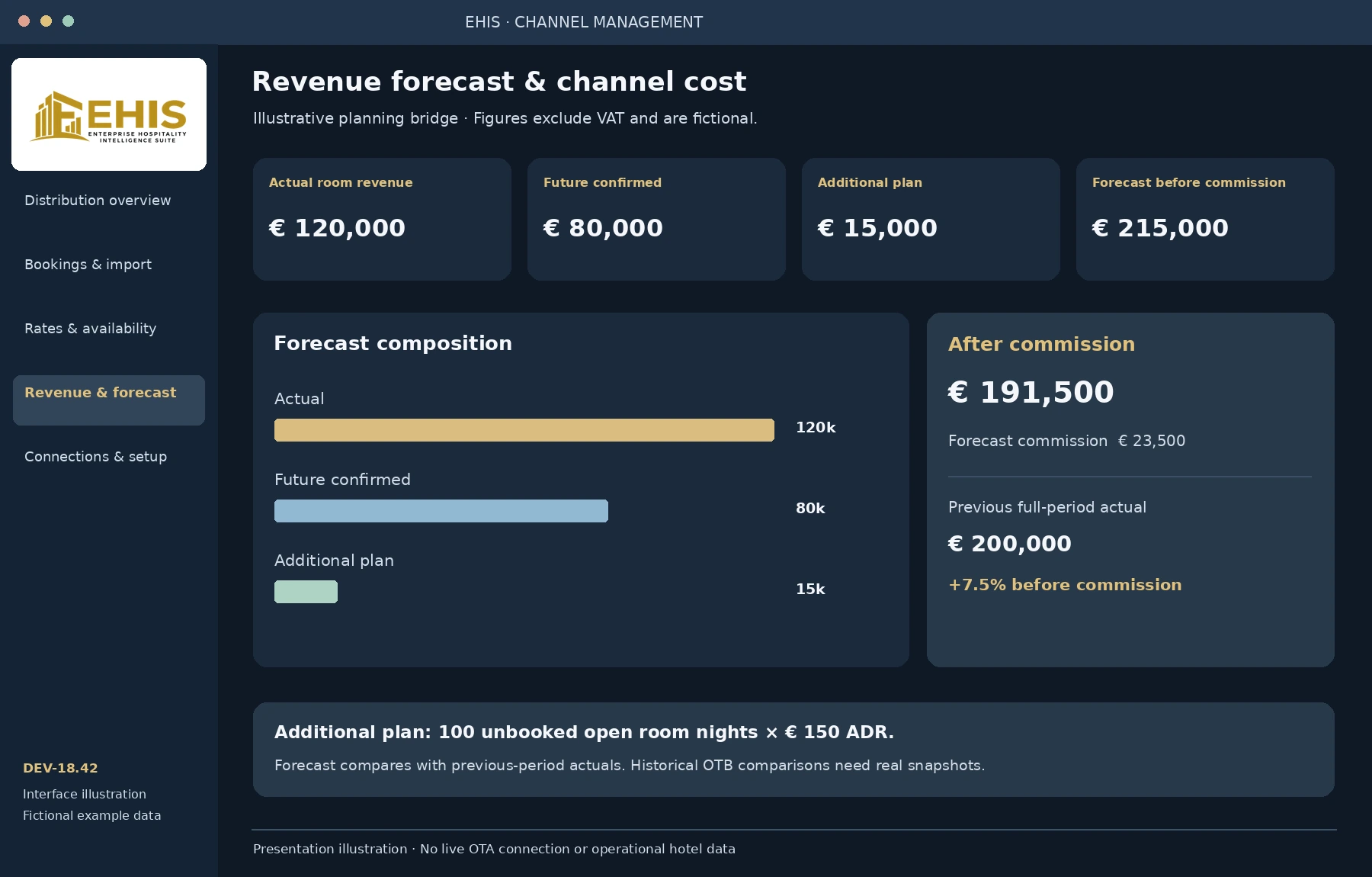
Illustrative forecast bridge · Not live hotel data
What the management report covers
Measure
Meaning in EHIS
Management use
Room revenue
Realised stay-night revenue, before commission and excluding VAT; confirmed future business shown separately.
Follow delivered and booked business without treating every booking as an actual stay.
Commissions
Amounts by channel and in total, with actual and contract-estimated commissions identified.
Understand the distribution cost attached to the reported revenue.
Revenue after commission
Room revenue less the associated channel commission.
Compare contribution before other hotel operating costs; this is not operating profit.
ADR / net ADR
Actual room revenue, before / after commission, divided by actual sold room nights.
Evaluate achieved rate and the effect of distribution cost.
Occupancy / RevPAR
OTB occupancy uses active booked nights and the full period's capacity. Actual RevPAR uses actual revenue and capacity through the cut-off.
Read each measure with its own date basis and complete inventory coverage.
Forecast
Actual revenue + future confirmed revenue + explicitly planned additional revenue on unbooked open capacity.
State the assumptions for extra room nights, ADR and commission.
Channel mix & commission ratio
Each channel's share of OTB revenue; total commission divided by corresponding revenue.
Compare the weight and cost of direct, OTA and other sources.
Booking & data quality
Room nights, reservation count, cancellation ratio, room-night-weighted booking lead time, missing inventory and oversold nights.
Identify gaps before relying on the result or sending availability.
Choose your comparison
Previous year, one to ten years back, or a custom start and end date. Actual year comparisons align the cut-off; forecast compares against the complete comparison period's actuals. Missing source data is shown as unavailable.
Export a reviewable report
HTML report files can be printed or saved as PDF in the browser. CSV supports further review. The integrated daily close retains dated report versions and separate payment, outlet and channel sections.
Current OTB data is not a historical OTB snapshot. Reliable pickup and same-time-last-year OTB comparisons require retained historical snapshots, which are not present in this release. Channel reports are EUR-based; foreign-currency source data requires a documented conversion.
See the workflow
Eight views. From booking to close.
Explore the channel workspace and its place within EHIS. Select an image for a larger view.
These are English-language interface illustrations based on the DEV-18.42 workflows, not live application screenshots. All records and figures are fictional. The current desktop application includes German interface labels.
Showing all 8 views.
distribution · Illustration
Distribution overview
A configured 350-room inventory, a channel catalogue and an explicit provider-setup status.
distribution · Illustration
Rates & availability
Room-type capacity, remaining inventory, rates, minimum stay and stop-sell settings.
distribution · Illustration
Bookings & import review
Normalised room-night rows with booking references, revenue, commission and booking status.
reporting · Illustration
Revenue & forecast
Actual revenue, future confirmed business, additional planning and revenue after commission.
reporting · Illustration
Channel revenue & commissions
Individual channel revenue, commissions and totals, before other operating costs.
operations · Illustration
Guided setup & mapping
Hotel master data, rooms, provider configuration and a guided connection checklist.
operations · Illustration
Room accounts & settlement
Overnight charges, outlet postings, external payment records and the remaining guest balance.
reporting · Illustration
Daily close & reconciliation
Business date, closing boundary, payment methods and separately identified channel figures.
Channel Manager handbook
A practical route. From setup to review.
Use this guide to understand the current workflow. Enter real property data in the Windows software. This website presents the product and does not collect guest records or API credentials.
Feature reference: DEV-18.42
01Prepare the property and permissions
Start the local EHIS application and sign in with your personal account. Open the setup checklist and enter the property identity, address, country, timezone, currency and responsible contact. Complete the legal issuer and bank fields for invoice drafts.
Confirm the actual room structure. The prepared configuration contains 350 rooms, five restaurants, five bars, five additional outlets and five event rooms, plus reception, shop and kiosk. Replace placeholder names and verify active room types.
Set staff roles and explicit function permissions before financial actions. A staff priority is not an access permission. The current local workflow is for one workstation; simultaneous multi-terminal operation still requires implementation and acceptance testing.
02Create the inventory calendar
Import or enter the confirmed room capacity by room type and date. Capacity initialisation starts with zero rates and stop sell enabled. Set real rates and restrictions before releasing inventory.
Keep physical capacity as one shared pool. Do not duplicate the same rooms for every OTA. Check for missing calendar dates and oversold room nights before preparing an update.
The local stay ledger and channel room-night dataset are separate modules in this release. Reconcile them with the leading PMS before using the calendar for online distribution.
03Map each channel and test its access
Choose a catalogue source or create your own channel. Enter the property, room-type and rate-plan IDs supplied for that connection, together with the agreed commission basis.
In the local server setup, configure an approved channel provider or adapter and its authorised credentials. Test capabilities first, then use a small controlled booking retrieval and inventory update.
An entry in the catalogue or a saved credential is not a successful connection. Keep channels on stop sell until mappings, acknowledgements and the OTA extranet have been checked.
04Enter or import room-night data
For a booking, provide the reference, booking date, arrival, departure, property, source, room type, status, number of rooms, total stay revenue and commission. Departure is exclusive. Revenue and commission are allocated across nights.
Use CSV or normalised JSON for import. Review new and updated rows in the preview, then explicitly commit. A matching property, source, reference, stay date and room type updates an existing row.
Reconcile cancellations and changed stays. If a stay becomes shorter or changes room type, obsolete room-night rows need to be removed or cancelled. Importing the remaining nights alone does not remove the old ones.
05Prepare rates and availability (ARI)
Select the property, dates and target channel. Check mappings, inventory coverage, rates, minimum stay and stop sell. The prepared availability deducts active booked room nights from the physical pool.
Export a prepared ARI file for inspection, or use the configured online bridge after explicit review and confirmation. A local export is not sent automatically.
Inspect the receipt and reconcile the provider result. Accepted means the bridge received the request; it does not prove the OTA applied it. Investigate unclear results before repeating a send. Continuous automatic synchronisation is not provided.
06Build the revenue report and comparison
Choose the reporting period, channel and cut-off date. Review actual revenue, confirmed future room nights, commission, net contribution and the quality indicators before drawing conclusions.
For the forecast, state the percentage of unbooked open future capacity expected to sell, the ADR and commission for that extra business. Additional planning is available on the all-channel view; it does not uplift existing bookings.
Select the previous year, an older year or custom dates. Historical same-time OTB and pickup need actual snapshots. Export the HTML report for printing / PDF, or use CSV for detailed review.
07Connect the operational and daily-close view
In the hotel workflow, link each guest and billing recipient to the correct stay. Local room accounts can contain overnight charges, outlet sales and separately recorded cash, externally processed card payments or confirmed bank transfers.
The channel dataset does not automatically create or synchronise every guest folio. Reconcile references and posting status with the leading PMS; do not assume that a retrieved booking has already created a complete guest account.
Select the last complete business day using the hotel timezone and closing boundary. Close and count cashier shifts before saving a management close. Review payments, outlet activity and channel commissions separately. Channel room revenue excluding VAT is not added to local gross POS sales; this avoids an unsupported combined total. The management close is not a fiscal Z-report.
08Secure the data and request support
Keep provider credentials in the local server configuration, never in website HTML or support screenshots. Use the supported backup and restore functions and keep backup passwords separately.
The hotel server uses an encrypted local store; the channel workspace has its own dataset and backup workflow. Do not assume a single export covers both. Validate restore procedures and permissions before operational use.
For support, contact info@volker-weber.de with DEV-18.42, the affected action and the full error message. Remove guest details, bank information, card data and API secrets. Support and product discussions are handled by Volker Weber.
This website handbook explains the current development release. Supplier requirements and final property configuration take precedence over illustrative examples.
A server-side provider bridge is prepared. Approved credentials, supplier adapters where needed, property mappings, real-data tests and operational reconciliation are required before live use.
Further production work
Hotel-wide rollout
Continuous PMS / OTA synchronisation, historical pickup snapshots, proven simultaneous multi-station operation and production acceptance remain separate work. Fiscal and payment integrations need their own implementation and approval.
Software reference: DEV-18.42 · Page and handbook edition: 18 October 2026. No live provider connections, certifications or automatic overbooking guarantee are implied.
EHIS Channel Manager is part of the Enterprise Hospitality Intelligence Suite, developed by Volker Weber. The approach draws on his experience in hotel leadership, operations and food & beverage management.
The aim is practical: make booking sources, room performance and channel costs understandable in the context of the whole hotel.
Are Booking.com, Expedia and all other OTAs already live?
No. They are catalogue sources for configuration and reporting. Live use requires approved supplier access, a working provider adapter, property and rate mappings, and acceptance tests. EHIS does not claim a certified partnership with any listed provider.
Can I compare revenue with earlier years?
Yes, if the source data is available. Choose the previous year, up to ten years back, or custom comparison dates. Historical OTB / pickup is a different comparison and requires retained snapshots.
Does the forecast use an automatic revenue-management algorithm?
No. The current forecast is an explicit calculation from actual stays, future confirmed bookings and additional assumptions on remaining open capacity. It is not automated dynamic pricing or a full revenue-management system.
Can I enter guest or API data on this website?
No. This is a product introduction and handbook. It does not connect to your hotel or save guest, payment or provider credentials. Data entry takes place in the separately installed software.
Can this be operated as a production system for 350 rooms today?
The room structure is prepared, but this release is a local development workflow. Live supplier connectivity, hotel-wide simultaneous operation, full synchronisation, security procedures and production acceptance need further work.
Are the pictures real screenshots?
No. They are labelled English-language illustrations using fictional figures. They explain the current workflows without displaying real guest or hotel data.
Let's discuss your distribution
Your rooms. Your commercial priorities.
Contact Volker Weber about the Channel Manager and the requirements of your property.